



A lead opens ChatGPT and types: "What are the best [your category] tools for [your use case]?"
Thirty seconds later, they have a shortlist. An answer from an AI that has already decided whether you're worth mentioning.
Want to see it for yourself? Open ChatGPT or Perplexity and ask:
"What does [your company] do, who is it for, and how does it compare to [main competitor]?"
If the answer surprised you, or got something wrong, you may have a website problem on your hands.
This post covers why it happens, how to optimise your website for AI agents, and what to fix first – starting with a test you can run in 30 seconds.
The numbers that should change your priorities
94% of B2B buyers now use LLMs during their purchase journey. Half of them start in an AI chatbot rather than Google. And twice as many buyers now say generative AI is a more useful information source than vendor websites or sales teams.
The site you spent months getting right is losing the AI search visibility race to a machine that may or may not be describing you correctly.
On the platform side: ChatGPT handles roughly 78% of AI referral visits, Perplexity sits around 15%, and Gemini is at about 6.4%, though Gemini has been growing fast and the gap is closing.
Why conversion matters more than volume here
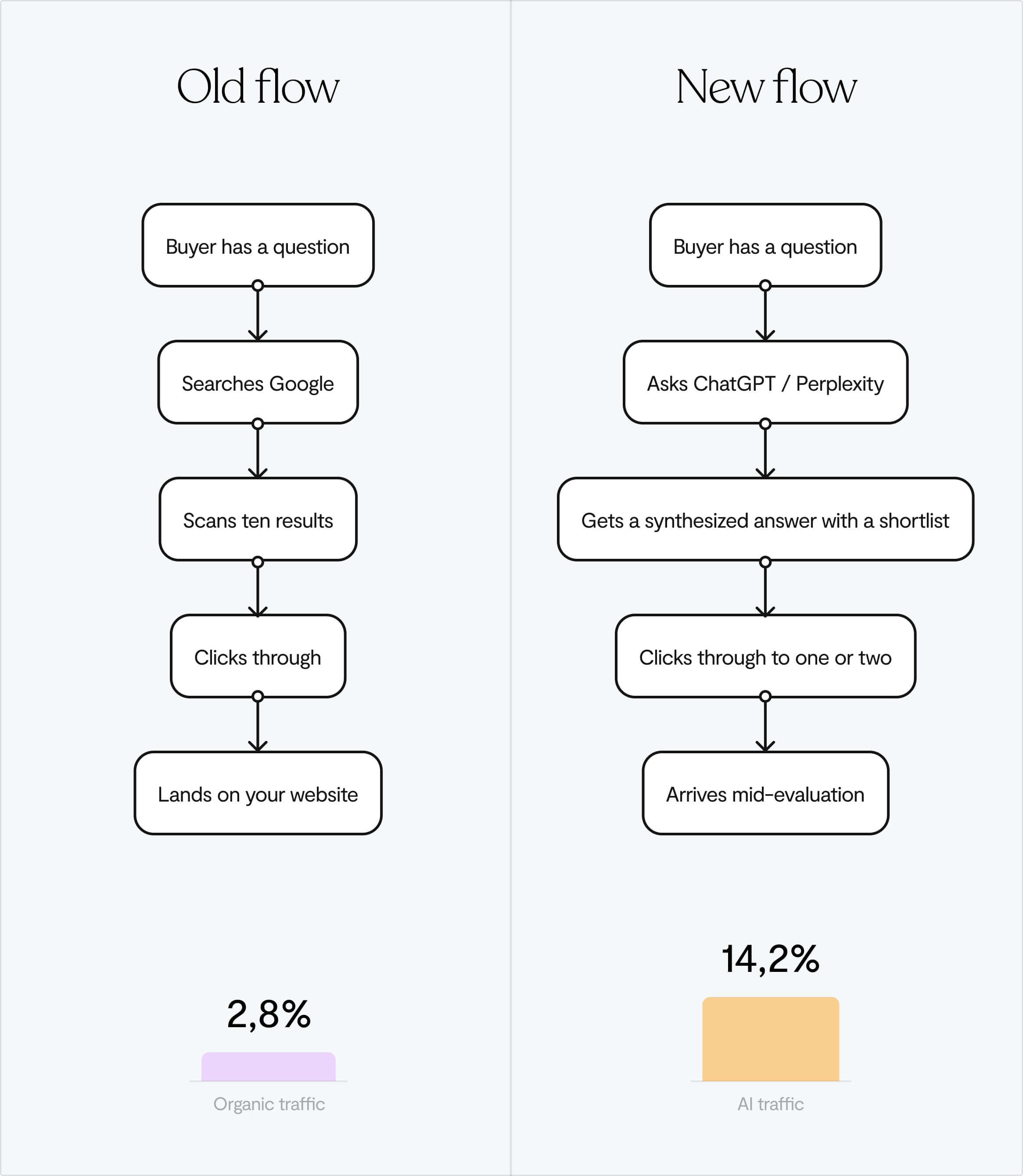
AI search traffic converts at 14.2% compared to 2.8% for Google organic. More than five times higher.
That’s because AI-referred visitors aren't browsing. They've already had a conversation about your category, been handed a shortlist, and picked you to look at more closely. By the time they land on your site, they're comparing, not discovering. Your job is to confirm what the AI said about you, not to introduce yourself.
If the AI said something wrong, you're starting your relationship with that prospect on a correction. And since your website is your primary sales tool in a PLG motion, that first impression matters more than ever.
A problem most founders don't know they have
AI is talking about your product right now, and it's probably getting things wrong.
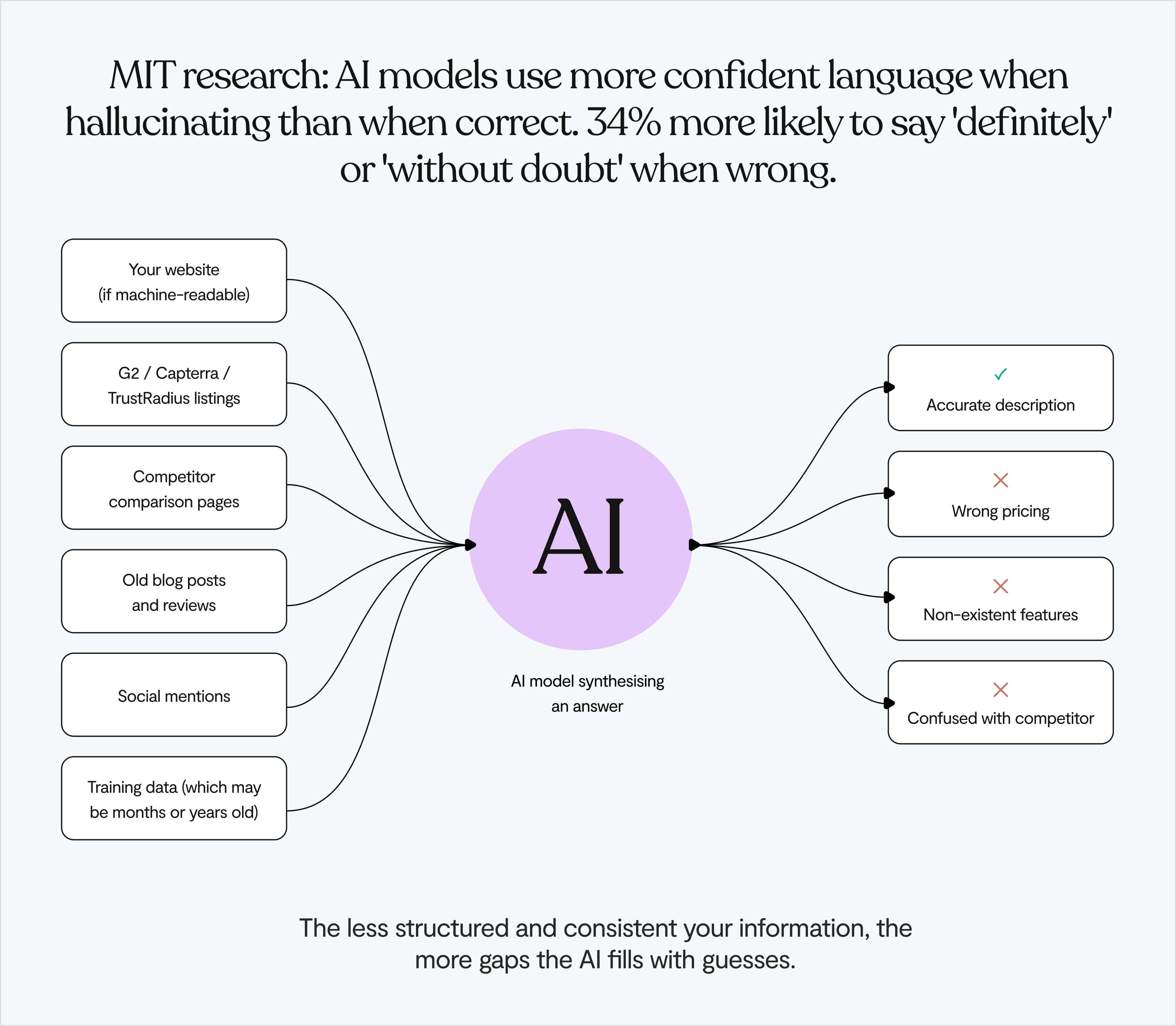
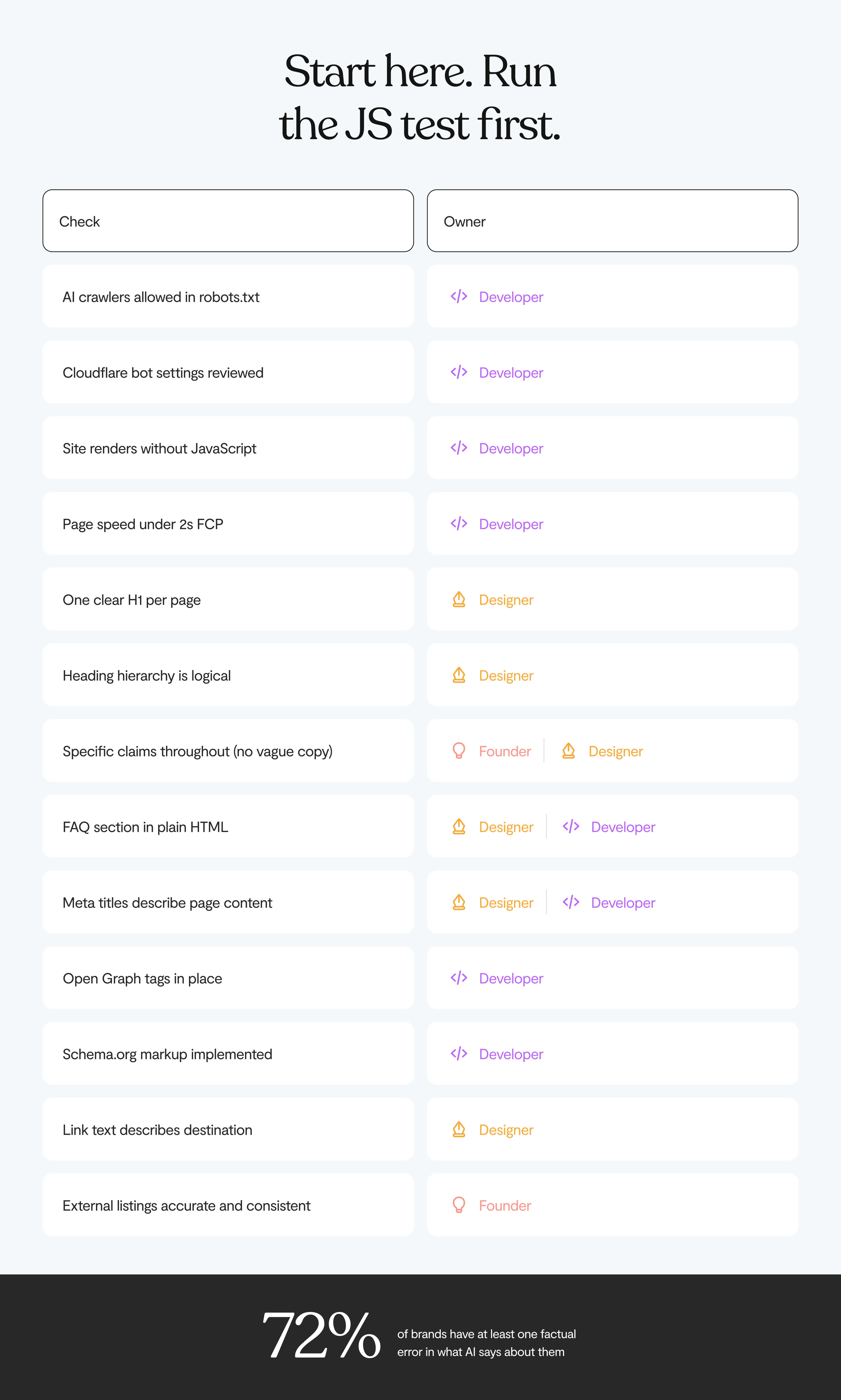
Across an audit of 50 brands on 8 AI platforms, 72% had at least one factual error in what AI said about them – what the industry is starting to call AI brand hallucination. The average was 3.4 errors per brand.
And this affects the common queries – "what does [brand] cost?", "how does [brand] compare to [competitor]?" The stuff your prospects are asking before they ever click on your site.
Common mistakes are ⬇️
⚠️ AI is describing what you do inaccurately
⚠️ AI is listing features your product doesn't have
⚠️ AI is blending your details with a competitor's, which is especially common in crowded categories
What makes it worse: MIT research found that AI models sound more confident when they're wrong. They reach for words like "definitely" and "without doubt" 34% more often when hallucinating than when they're actually right. So your prospect gets a confident, authoritative-sounding description of your product that's just incorrect.
Why it happens
AI models don't check facts in real time. They build answers from patterns in what they've already learned. That means the risk goes up when:
- Your own site doesn't clearly state what you do and for whom
- What your site says doesn't match what your G2 profile says, which doesn't match what some old review said
- Outdated information about you is still indexed somewhere online
- Your pricing and features only appear after JavaScript runs, which machines never wait for
The AI fills the gaps. It always will. The question is whether you've left gaps to fill. 👀
Why beautiful websites are invisible to AI crawlers
Some of the most technically impressive product sites – the ones with the layered animations, the smooth scroll effects, the React-powered everything – are the hardest for machines to read.
Because the architecture underneath the aesthetics wasn't built with a second audience in mind. Building a machine-readable website requires a different set of decisions than building a visually impressive one.
A deep rendering problem
GPTBot, ClaudeBot, and PerplexityBot don't execute JavaScript. They don't wait for the page to render. They grab the raw HTML and leave.
If your site is a React or Vue SPA built with client-side rendering, what an AI crawler actually sees is often just a shell – a header, a footer, and empty <div> tags where your content should be.
❌ Your headline
❌ Your positioning
❌ Your pricing
❌ Your differentiation.
All of it is gone, because it only exists after the browser runs JavaScript, and the crawler left before that happened.
On most modern SPAs, somewhere between 50 and 80% of the content is invisible to AI crawlers.
A 30-second test
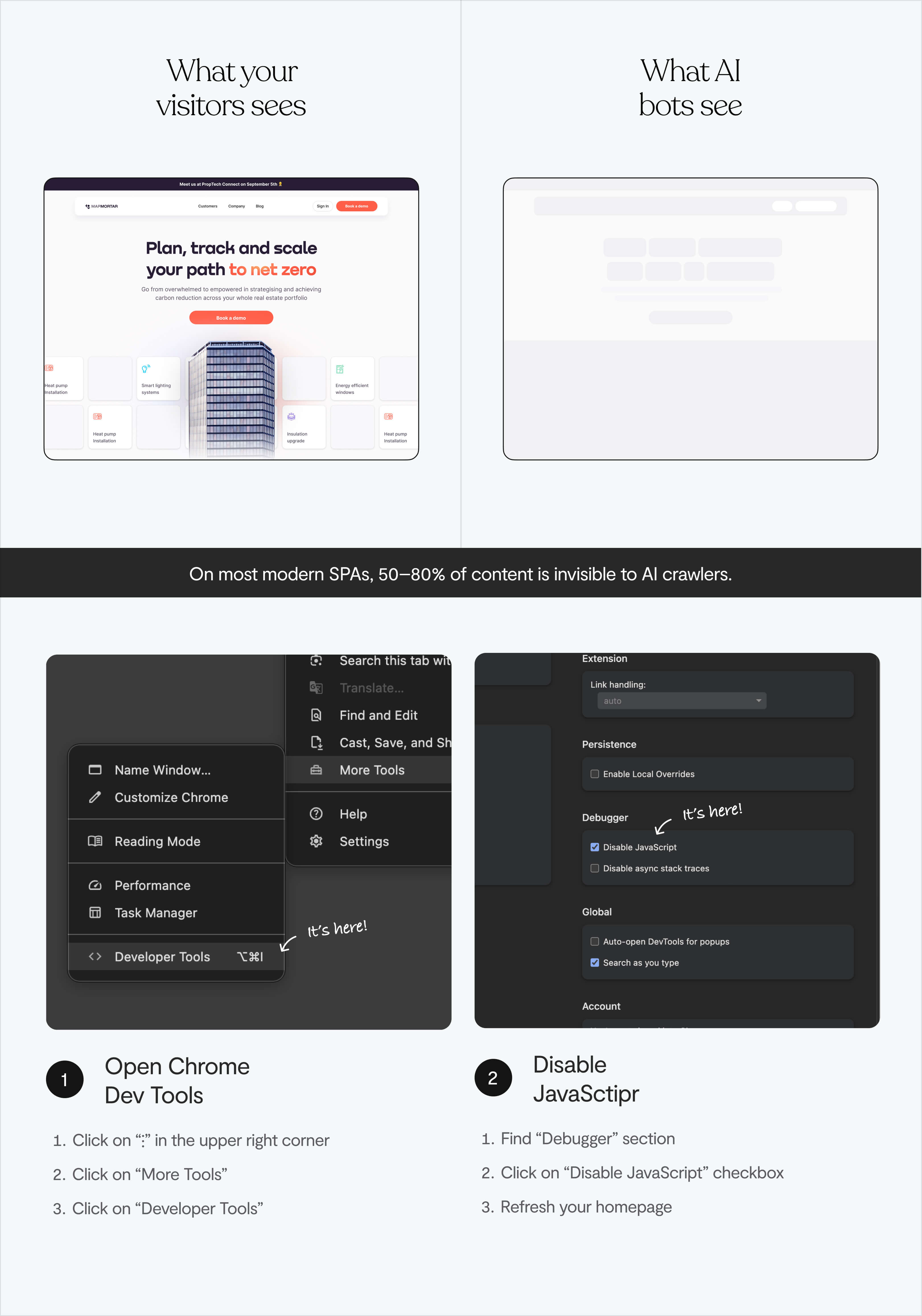
Open Chrome DevTools. Settings → Preferences → Debugger → Disable JavaScript. Refresh your homepage.
Whatever's still visible is roughly what AI models can access.
If your hero section, your features, your social proof all disappear – you've disappeared from every AI research conversation your prospects are having. ⚠️
The structure problem (for sites that do render correctly)
Even if your content loads fine without JavaScript, there's a second layer to this.
A page full of <div> and <span> tags tells a machine almost nothing about what's important or how the page is organised.
A human reader can figure out hierarchy from visual weight: what's big, what's bold, what's grouped together. Machines need that hierarchy to be stated in the code itself, not implied by how something looks.
What is MX design?
Part of the design world is calling this shift a move from UX to AX – Agent Experience.
Some call it Generative Engine Optimisation (GEO), the practice of making your content not just findable, but citable and accurately representable by AI systems.
Machines don't navigate visually. They read structure, parse metadata, and extract meaning from how content is organised in code. A clever layout means nothing to them. A clear <h1> means everything.
The good news is that making a site machine-readable and making it better for humans is almost entirely the same work.
✔️ Cleaner hierarchy
✔️ More specific language
✔️ Less hiding meaning behind visual effects.
What MX design punishes is the same thing bad UX punishes: clarity sacrificed for aesthetics.
The three AI platforms don't trust you the same way
"Optimise for AI" isn't one thing. The major platforms source information differently, which changes what you need to do.
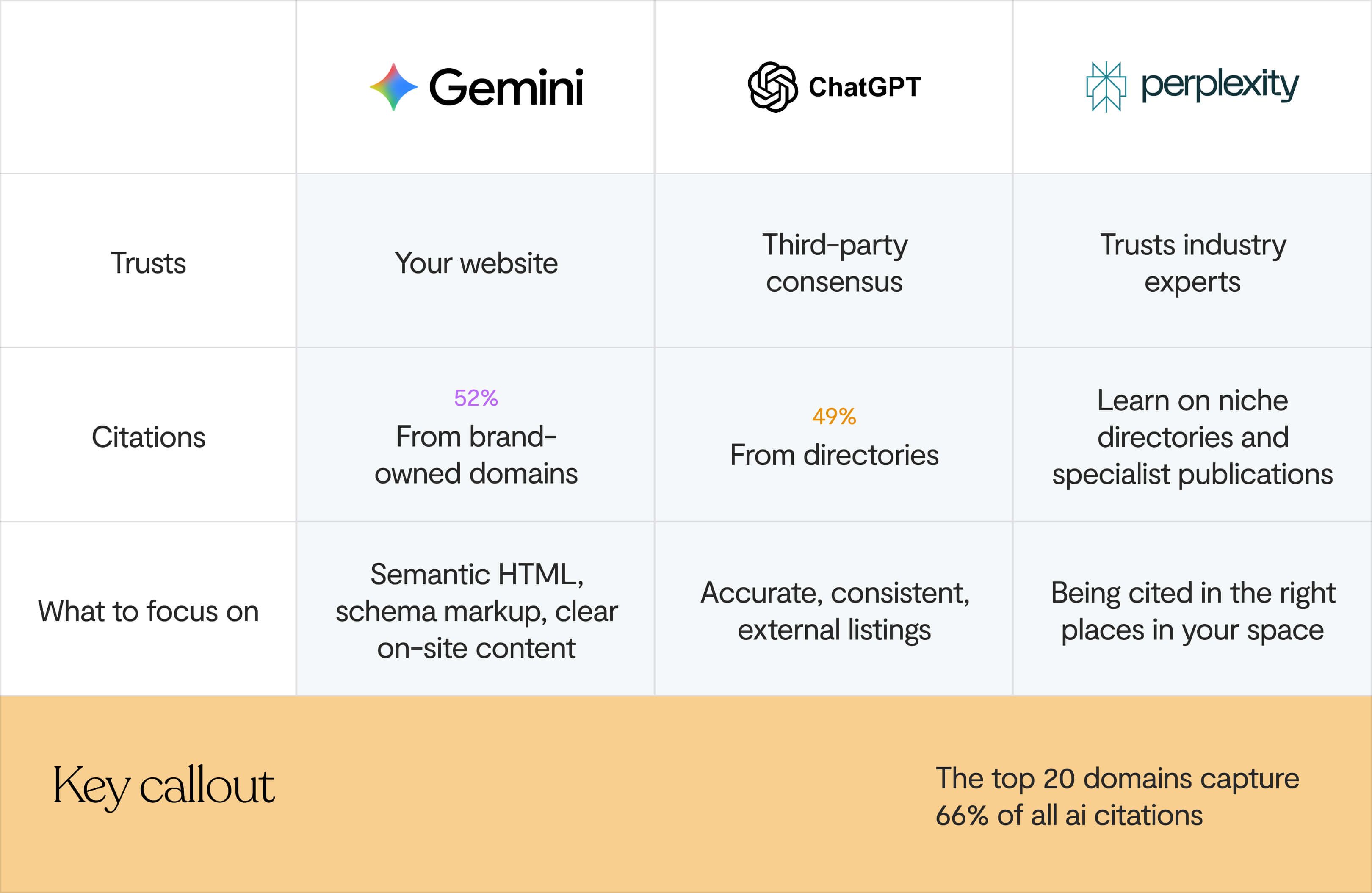
Yext looked at 6.8 million citations across 1.6 million responses from Gemini, ChatGPT, and Perplexity. Each platform has a distinctly different sourcing pattern.
Gemini trusts your website. 52% of Gemini citations came directly from brand-owned domains. It wants to hear it from you, in a format it can read.
ChatGPT trusts what the internet agrees on. 49% of its citations come from third-party directories — G2, Capterra, TripAdvisor, MapQuest. For comparison searches, that number climbs even higher.
Perplexity trusts experts. It leans on industry-specific sources and niche directories over general listings. Being in the right publications in your space matters more than broad coverage.
In practice:
- For Gemini: your own site needs to be the clearest, most structured source of truth about your product
- For ChatGPT: your G2, Capterra, and Product Hunt profiles need to be accurate, complete, and match what your site says
- For Perplexity: you need to be in the publications and communities your buyers actually read
And across all three: the top 20 domains capture 66% of all AI citations. Once those positions are taken, they're hard to shift. AI systems lean on what they already know. So moving early matters.
The audit: how to optimise your website for AI agents
0. Check you're not accidentally blocking AI crawlers
Many sites block AI crawlers without realising it – and an AI crawler can't index your website if you've accidentally locked the door. There are two common ways this happens:
Your robots.txt file. Open yourdomain.com/robots.txt. Check whether GPTBot, ClaudeBot, PerplexityBot, or OAI-SearchBot are being blocked – either explicitly, or caught by a broad Disallow: / rule. If they are, you're invisible to AI search by your own instruction.
GPTBot is OpenAI's training crawler, while OAI-SearchBot and ChatGPT-User are the ones that power live ChatGPT search results. You can block the training crawler and allow the search crawler, they're separate. Here's the structure:
# Allow AI search (live query access)
User-agent: OAI-SearchBot
User-agent: ChatGPT-User
User-agent: PerplexityBot
User-agent: ClaudeBot
Allow: /
# Block admin areas for all bots
User-agent: *
Disallow: /admin/
Disallow: /private/
# Reference your sitemap
Sitemap: https://yourdomain.com/sitemap.xml
Your Cloudflare or WAF settings. Cloudflare changed its default configuration to block AI bots. If you're running Cloudflare and haven't reviewed your bot management settings recently, there's a real chance AI crawlers are being turned away before they even see your robots.txt. Check under Security → Bots in your Cloudflare dashboard.
If either of these is wrong, fix it before anything else. You can do everything right technically and still be invisible if the door is locked.
1. Run the JavaScript test today
If your site disappears when you disable JavaScript, you have a client-side rendering problem.
Fix it by rebuilding with server-side rendering – Next.js, Nuxt, and Angular Universal are the standard options. This means your content exists in the initial HTML, not just after the browser finishes its work.
Or use a pre-rendering service like Prerender.io that sends static HTML to crawlers while keeping the full JavaScript experience for human visitors.
2. Check page speed
Many AI crawlers have tight timeouts of 1–5 seconds for retrieving content. If your page is slow to respond, it gets dropped entirely before the crawler has seen anything worth extracting.
Run your homepage through Google PageSpeed Insights or Lighthouse. Focus on Time to First Byte (TTFB) and First Contentful Paint. These are the signals AI crawlers care about most. Slow pages lose the race before they've even started.
3. Look at your heading structure
Open your homepage source or use a browser extension to see your heading outline. Then ask:
- Is there one <h1> that clearly says what your product does and who it's for?
- Do your <h2> and <h3> headings form a logical structure, or are they just font-size decisions from a Figma file?
- If you read the headings top to bottom, does the page make sense?
Machines use heading hierarchy to understand what a page is about and pull out what's important. If yours is a mess, your page is a mystery.
4. Get specific everywhere
A case study that says "improved productivity" is invisible to an AI agent. "Reduced processing time from 14 days to 3 days" is something it can actually extract and use.
Go through your homepage with that filter:
- Features: "powerful reporting" → "custom dashboards with 40+ metrics"
- Outcomes: "teams move faster" → "average onboarding drops from 6 weeks to 9 days"
- Pricing: "flexible plans" → actual numbers, with a date ("starts at $299/month as of March 2025")
- Integrations: "connects with your tools" → a named list
Vague copy underperforms with human readers. With machines, it's an open invitation to fill in the blanks incorrectly.
5. Add a FAQ section
This is one of the most underused levers, and it works on multiple levels.
AI agents are specifically optimised to extract Q&A-formatted content because it maps cleanly onto the conversational queries people type into ChatGPT and Perplexity. A FAQ section on your homepage or pricing page lets you answer (in plain HTML) the exact questions your prospects are asking before they reach you:
- What does [product] cost?
- How is [product] different from [competitor]?
- Who is [product] for?
- Does [product] integrate with [tool]?
Write the answers as direct, complete sentences. This is the content machines extract most reliably, and it's also where hallucinations are most likely to be corrected, because you're directly supplying the right information in a format designed to be pulled.
Pair this with FAQPage schema (see below) and it becomes your single most powerful anti-hallucination tool on the page.
A well-structured FAQ section also improves your PLG onboarding path. If someone arrives from an AI recommendation already knowing what the product costs and who it's for, the job of onboarding them changes significantly.
6. Check your meta titles, descriptions, and Open Graph tags
Every page should have a title that actually describes the content (not "Home" or "Features" or "Platform") and a meta description that answers: what is this page, who's it for, what will they find?
Also worth adding: Open Graph tags (og:title, og:description, og:image). These are the tags that control how your page looks when shared or previewed, and several AI platforms now use them when generating previews or snippets of your content in their interfaces. Having clear Open Graph metadata improves how AI search results represent your site visually, especially in Perplexity and AI Overviews.
Together, these are among the first signals an AI crawler reads when it hits your site. Generic or missing tags are wasted signals.
7. Add Schema.org markup: the most direct signal for AI search visibility
Sites with schema markup show up in AI-generated results 2.4x more often. But 88% of websites still don't have it.
Schema markup is JSON-LD code that sits in the <head> of your pages. It tells machines what things mean, not just what they say. Start with:
- Organization – who you are, what you do, how to reach you
- SoftwareApplication or Product – what you offer, what it costs, who it's for
- FAQPage – structured answers to the questions buyers actually ask
- PricingSpecification – explicit, machine-readable pricing
If you can only do one thing right now: add Organization schema to your homepage. It's the biggest single lever for reducing wrong information about your company showing up in AI answers.
8. Fix your link text
Every "click here" and "learn more" on your site is useless to a machine. AI agents read link text to understand where a link goes and what's waiting there.
✔️ "Book a strategy call" works
❌ "Get started" doesn't.
Go through your CTAs and make each one say what actually happens when you click it.
9. Update your external listings
A lot of hallucination problems don't start on your website. They start on an outdated G2 profile, a Capterra listing with pricing from two years ago, a Product Hunt page that still mentions a deprecated feature.
Go through:
- G2, Capterra, TrustRadius
- Product Hunt
- Category-specific directories in your space
- Crunchbase and LinkedIn company page
Inconsistency between sources is where hallucinations are born. Make sure everything says the same thing, and that what it says is still true.
What to ask your design & development team
Knowing what to fix is one thing. Getting it across to the person who has to actually fix it is another. Here are the questions worth asking, and what you should expect to hear back.
Ask your designer
"Can you show me the heading outline of our homepage?"
There's a free Chrome extension called HeadingsMap that renders your heading structure as a tree. Have them pull it up together.
A good answer: one H1 that states what the product does and who it's for, with H2s and H3s that create a logical flow underneath. A red flag: multiple H1s, headings that say "Welcome" or "Our Story", or a structure that looks like it was set by font size in Figma rather than meaning.
"Do we have a FAQ section, and is it in plain HTML?"
If the answer is no, this is one of the highest-return things you can add. Questions like "What does [product] cost?", "How is [product] different from [competitor]?", "Who is [product] for?" – written as complete, direct answers in plain HTML.
"Does key content (our headline, features, pricing) appear immediately on the page, or does it slide in through animations?"
Delayed loading and scroll-triggered animations can push important content below where AI crawlers stop reading. If your positioning statement only appears after a 300ms fade-in, some crawlers miss it. The visual effect can stay, the content just needs to exist in the DOM on load, not after it.
Ask your developer
"Does our site render without JavaScript – can you show me?"
Have them open Chrome DevTools, disable JavaScript, and refresh the homepage while you watch. If your headline, features, and pricing disappear, you have a client-side rendering problem. The fix is server-side rendering (Next.js, Nuxt, Angular Universal) or a pre-rendering service like Prerender.io.
"Are we blocking any AI crawlers in our robots.txt or Cloudflare settings?"
Ask them to open yourdomain.com/robots.txt and check whether GPTBot, ClaudeBot, PerplexityBot, or OAI-SearchBot are being blocked – explicitly or caught by a broad Disallow: / rule. Then check your Cloudflare bot management settings. Cloudflare changed its defaults and silently blocks AI crawlers on a lot of sites. Either issue means you're invisible to AI search regardless of everything else you fix.
"Where does our pricing actually live in the HTML?"
Ask them to open the pricing page, right-click, and choose View Page Source – not Inspect, source. If your pricing numbers don't appear in that raw view, AI crawlers never see them. That's a direct cause of pricing hallucinations. The fix is making sure pricing renders server-side, not client-side.
"Do we have Schema.org markup, and can you show me what the Rich Results Test returns?"
Run your homepage through Google's Rich Results Test together. If it comes back blank or partial, you have gaps. The priority order: Organization on the homepage, SoftwareApplication or Product on product pages, FAQPage wherever you have Q&A content. Organization schema alone is the single most effective fix for reducing wrong information in AI answers.
"What's our Time to First Byte and First Contentful Paint?"
Many AI crawlers drop pages that take longer than 1–5 seconds to respond. Run the homepage through Google PageSpeed Insights. A TTFB above 600ms is worth fixing. A FCP above 2.5 seconds means crawlers may be timing out before they've extracted anything useful.
💡 If you're looking for design support to act on any of this, here's our guide to finding the right UI/UX design agency for your stage.
A word on llms.txt
llms.txt is a proposed standard – a plain-text file in your site's root directory that tells AI crawlers which pages matter and how to interpret your content. Think of it like robots.txt, but aimed at LLMs rather than search engines.
The reality though is that it's still a proposal. OpenAI, Google, and Anthropic haven't publicly committed to using these files when they crawl. Server log analysis has shown that the major AI crawlers (GPTBot, ClaudeBot, PerplexityBot) aren't actually requesting the file right now.
If your developer can add it in an hour, sure. It's a low-cost bet that the standard eventually gets adopted. But it won't move anything today.
The bottom line
Nothing in this post trades off against having a good site for humans.
Getting your site to work for machines is mostly just getting it to be more honest and more clear. Which, if you've spent any time thinking about what makes product copy actually work, you already know is the right direction anyway.
- Cleaner heading hierarchy makes your copy easier to scan
- Specific claims convert better than vague ones
- Accurate external listings help with trust at every stage of the funnel
- Semantic HTML also helps screen readers and assistive technology
- SSR makes pages load faster for everyone
- A FAQ section helps humans and machines equally
- Page speed matters for conversion as much as it does for crawling.
The founders we work with at Lumi are usually trying to look bigger and more credible than their headcount would suggest. Clarity is how that happens.
And right now, most of your competitors haven't run the JavaScript test. Haven't checked their Cloudflare bot settings. Haven't looked at their G2 profile in two years. Haven't asked their designer whether the homepage heading structure makes any sense.
💡 At Lumi, we think about both audiences – the people who use what we build, and the machines that increasingly describe it. If you're rethinking your product site and want that kind of thinking in the room, let's talk.