


Bad UX rarely looks like bad UX. It looks like users who signed up and never came back, a product that's hard to demo without narrating it, and a support queue full of questions that should have been answered by the interface.
Getting UX right at the early stage comes through a handful of structural decisions (some of them invisible) that either compound in your favour or against you.
We've worked with 50+ startups from pre-seed to Series B. This is what that looks like in practice. ⬇️
What is UX design for early-stage startups?
UX design for early-stage startups is the process of understanding user needs deeply enough to build a product that fits their workflow – and structuring it clearly enough that users can get value without guidance. At the early stage, it is less about aesthetics and more about validation, clarity, and onboarding.
42% of startups fail because they build something nobody needs – not because the product was ugly, but because it didn't solve a real problem for real people in a way they could act on.
That's a user research failure, not a design failure.
Good UX at the early stage has almost nothing to do with aesthetics. It's achieved through understanding your users deeply enough to build something that fits into their lives and their workflows – and structuring it clearly enough that they can figure out how to use it without you standing next to them.
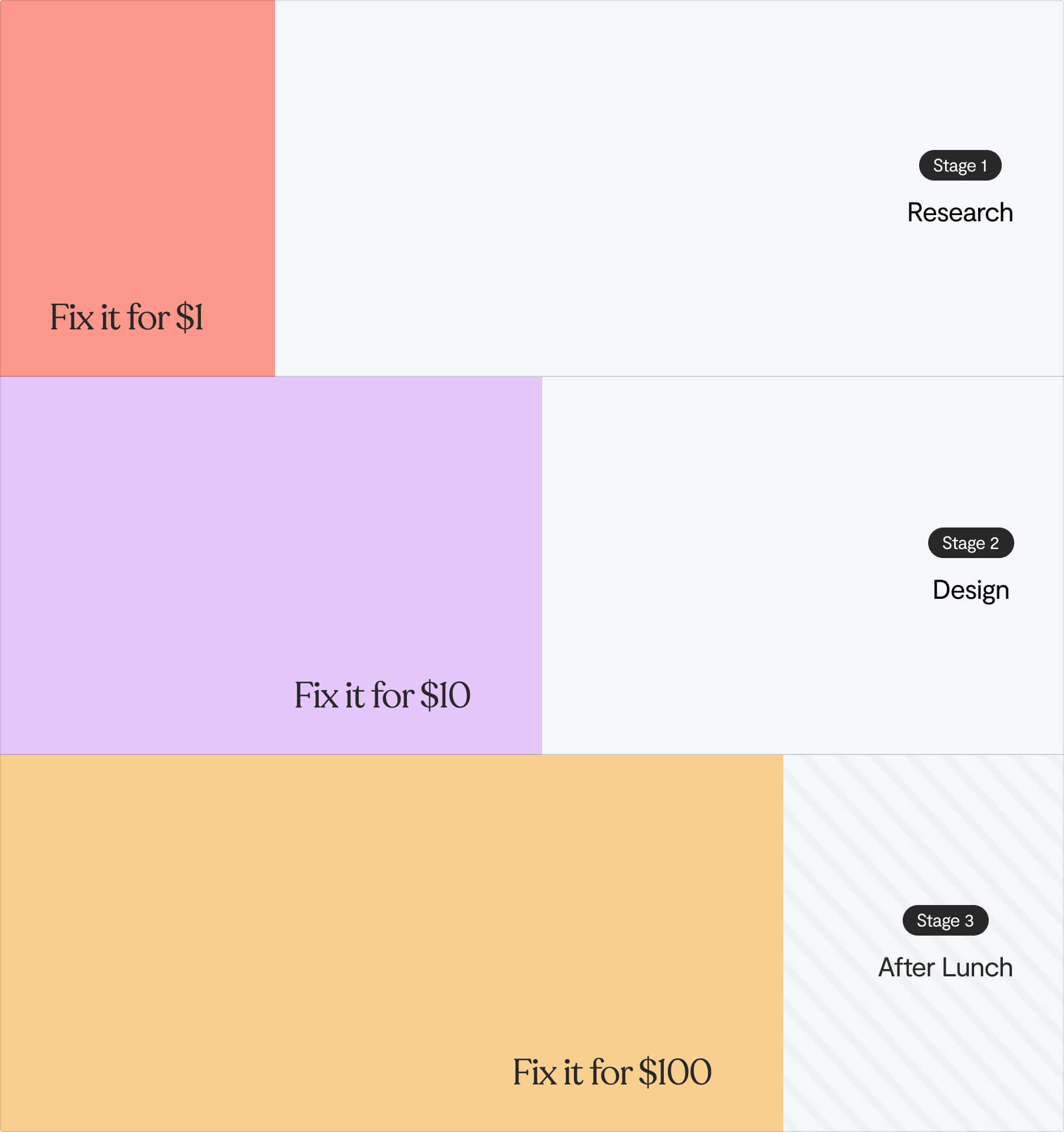
Forrester's research puts the return at $100 for every $1 invested in UX. Nielsen Norman Group found that allocating just 10% of your development budget to UX gets you an 83% lift in conversion. The Interaction Design Foundation puts it this way: fix something in research for $1, in design for $10, or after launch for $100.
But you probably didn't come here to be convinced. So let's get into what to do. ⬇️
Before you build: why user research is validation for startups
The single fastest way to burn through runway is to skip straight to building.
You have a hypothesis about a problem. You have intuitions about the solution. And you have a very natural bias toward confirming those intuitions, because you've invested your time, your reputation, and sometimes your savings into them.
👀 Products developed with extensive user feedback are 2.6x more likely to succeed in the market.
Here's what early-stage UX research looks like in practice:
1️⃣ Problem interviews, not solution interviews. Before you build anything, talk to 15–20 people in your target segment. Don't describe your product. Ask:
- How do they currently handle this problem?
- What does it cost them, in time, money, frustration?
- How often does it come up?
- Would they pay to fix it?
Vague or unenthusiastic answers are data too.
2️⃣ The concierge MVP. Before writing any code, manually deliver the service your software will eventually automate. Airbnb's founders photographed apartments themselves. Zappos' founder photographed local shoe stores and shipped orders by hand. A week of doing it manually teaches you more about your users' actual workflow than months of building assumptions into a codebase.
2️⃣ Jobs-to-be-done thinking. Users don't buy products, they hire them to do a job. What functional, emotional, and social job is your user trying to get done? Answering this stops you from building features that look logical on a roadmap but don't serve the actual motivation behind the behaviour.
3️⃣ Competitor review mining. G2, Capterra, Trustpilot, app store reviews – the negative ones in particular. Real users, in their own words, telling you exactly what's broken about the existing solutions in your space. Free, constantly updated, and far more honest than any survey you'll run.
The goal of all this isn't to build a perfect product. It's to stop building the wrong one.
MVP UX: the paradox early-stage founders tend to miss
The MVP UX paradox is this: if your MVP is too hard to use, users abandon it not because the idea lacks value, but because the interface obscures it. You then cannot tell whether failure is a product problem or a UX problem, which means you may kill a good idea based on bad evidence.
Lean startup logic says: ship the minimum viable product, learn fast, iterate. But there's a UX wrinkle that's easy to miss.
If your MVP is too hard to use, users will abandon it not because the idea lacks value, but because the interface obscures it. And then you can't tell whether failure is a product problem or a UX problem.
Without adequate usability, an MVP test becomes a test of the interface, not a test of the idea.
You need to move fast, but if the experience is broken enough that users can't figure out what to do, you get noise instead of signal. You might kill a good idea because the design made it look bad.
This doesn't mean your MVP needs to be polished. It means it needs to be legible. A first-time user should be able to understand what the product does and complete its core workflow. Even if the edges are rough and the design is bare.
Strategic debt vs. toxic debt
Not all UX shortcuts are the same. There’s a distinction between strategic debt and toxic debt.
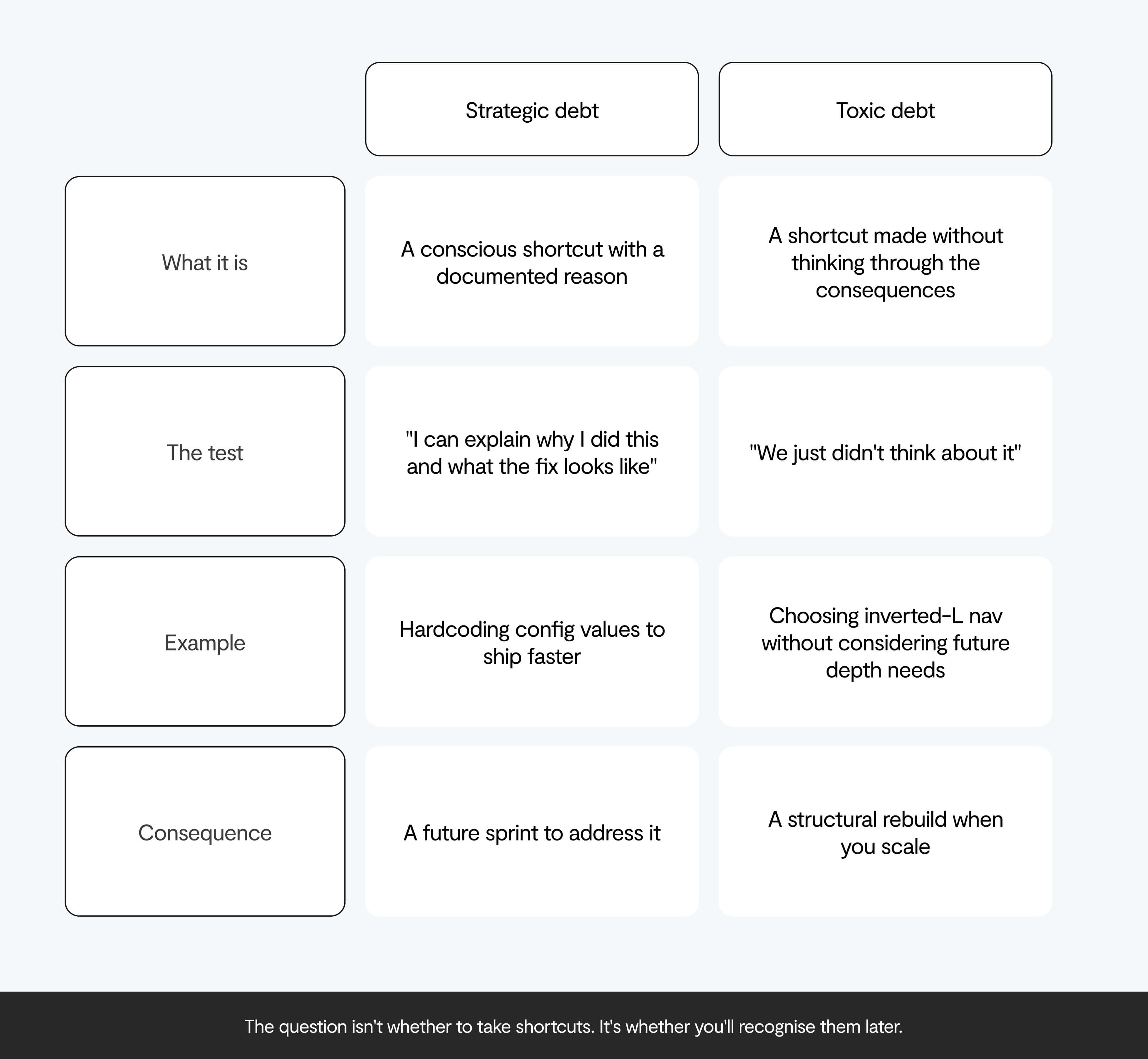
✅ Strategic debt is conscious. You skip animations. You reuse layouts. You hardcode things that should eventually be configurable. That's a deliberate trade-off: move fast now, clean it up once there's evidence it's worth cleaning up. Fine. That's the game.
❌ Toxic debt is when the shortcut constrains your ability to scale, and you don't realise it until you're months deep. The navigation pattern you chose because it looked clean at MVP turns out to only support a few tiers of content depth. Your B2B SaaS now has admin panels, reporting dashboards, and team management. You're stuck. (💡We went into this in detail here)
The test: can you say why you made each shortcut, and what the proper solution looks like when it's time to address it? If yes, strategic. If it's "we just didn't think about it", that's the other kind accumulating.
Budget 25–30% of dev time for QA, bug fixing, and iteration even at the MVP stage. Users may forgive missing features. They don't forgive broken ones.
3 UX design decisions that compound early on
Some design decisions look harmless in week one and cost you a full rebuild down the line. Here's where to spend your early-stage design attention. ⬇️
Navigation architecture
Your navigation isn't just a visual design choice, it's a structural decision that determines how much your product can grow without tearing itself apart.
👀 An inverted-L navigation (horizontal top nav plus left sidebar) looks clean and modern for an MVP. It works well up to about four tiers of content depth. B2B SaaS products rarely stay that simple. Once you've added feature sets, admin panels, reporting, and team management, you'll hit that ceiling fast. At that point you're either cramming content into a structure it wasn't built for, or starting over.
Make this decision looking at your 12-month roadmap, not your current feature list.
Design foundations
You don't need a full design system at the MVP stage. But you do need to establish design tokens: your colour palette, your typography scale, your spacing system. Even if it's just a shared Figma file and a CSS variables file in the codebase.
Why it matters
Without this, you end up with eight button variants scattered across your product six months later, each styled slightly differently, each behaving slightly differently under edge cases. Research from Delivery Hero showed a 57% saving in time-to-market when working with a design system vs. without one. Without design foundations, developers end up spending roughly 40% of their time on maintenance and refactoring instead of building new things.
Onboarding
We'll cover onboarding in depth below. But it belongs here because it's the highest-leverage UX decision most early-stage teams make too late: as an afterthought, once the product is built, rather than as a core design problem from the beginning. Onboarding is the frame through which users encounter your product for the first time. Get it wrong and nothing else matters.
Onboarding is your highest-ROI UX investment
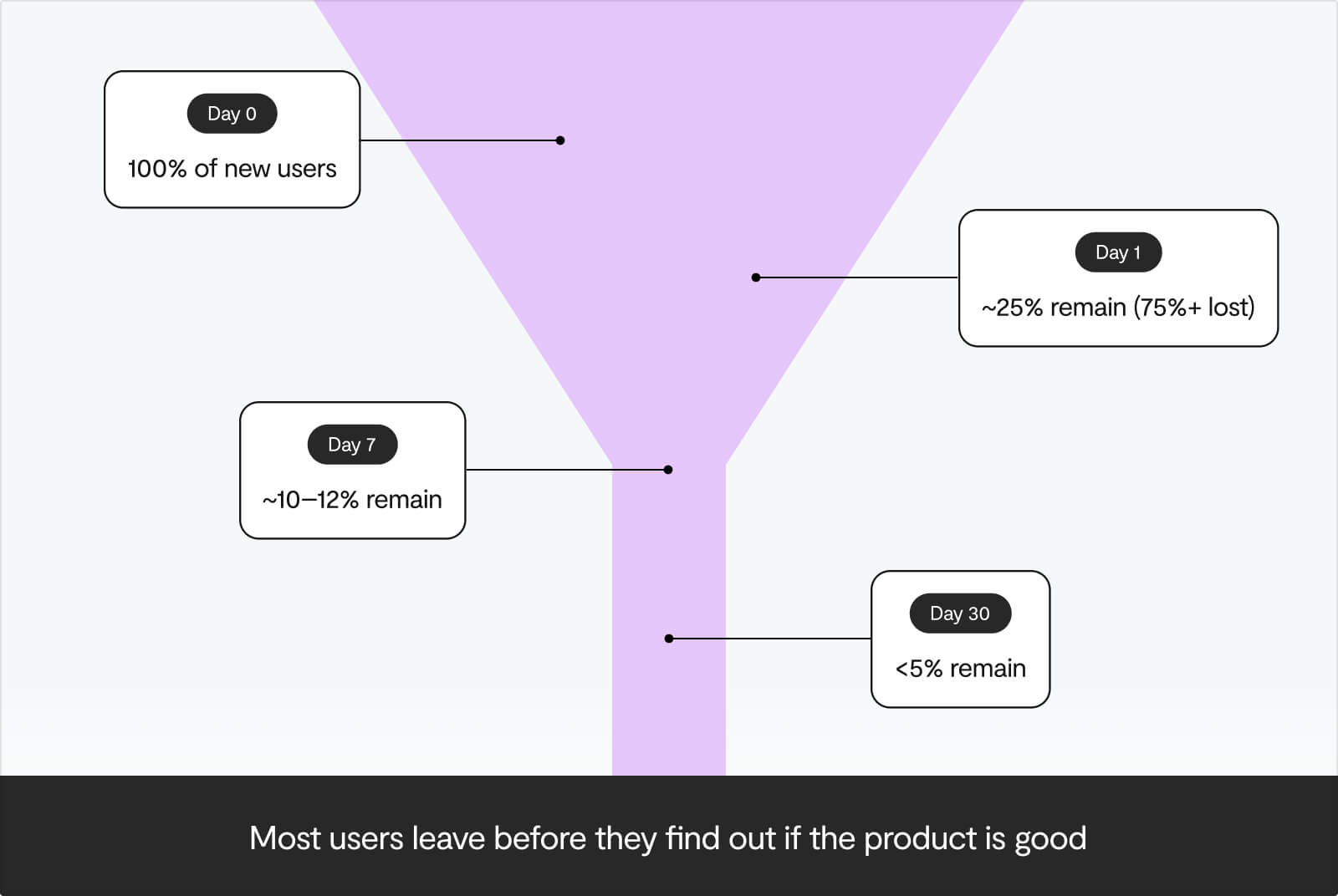
AppsFlyer's analysis of six billion app installs found that the average app loses over 75% of new users on day one. By day 30, fewer than 5% remain active. Eight out of ten users abandon apps because they don't know how to use them. Research on SaaS activation consistently shows 60–75% of new users churning in the first week – primarily from unclear value propositions, too many steps between sign-up and usefulness, and delayed value delivery.
None of these users left because the product was bad. They left before they found out.
Find your aha moment
Every product has one: the specific action that, once taken, dramatically increases the likelihood that a user sticks around. It's the moment someone stops evaluating your product and starts relying on it.
Facebook identified it as adding seven friends within ten days. Slack's is sending the first message to a teammate. Dropbox's is syncing the first file. These are the result of cohort analysis: looking at users who stayed vs. users who churned and finding the earliest behavioural differentiator.
Products that get users to their aha moment within five minutes of sign-up show 40% higher 30-day retention compared to those that take 15+ minutes. Companies that systematically optimise for it see 2–3x improvements in activation rates within 90 days.
Your entire onboarding should be engineered to get users there as fast as possible.
What works to nail your onboarding
Deliver a first win. Don't give a product tour.
The goal of onboarding isn't to teach users about all your features, it's to get them to a meaningful outcome. A user who completes your onboarding checklist but hasn't experienced any value hasn't been onboarded. They've been processed.
Don't gate the aha moment
The aha moment is the specific action a new user takes that most strongly predicts long-term retention: the point where they stop evaluating your product and start relying on it. Facebook's was adding seven friends in ten days. Slack's is sending a first message to a teammate. Identifying yours requires cohort analysis.
If users can experience core value before entering a credit card or agreeing to ToS, let them. Users who experience value before payment information convert at 2.5x higher rates than those required to pay upfront.
Keep it short
Chameleon.io's data is pointed: three-step onboarding tours have a 72% completion rate. Seven-step tours: 16%. The urge to show users everything is understandable. It's also the thing that kills activation rates.
Use progressive disclosure
Show only what's needed for this stage. Notion asks whether users are working alone, with a team, or for school – then tailors the first experience accordingly. Reducing cognitive load in the first session is one of the most reliable ways to increase activation.
Pre-fill with smart defaults
Blank slates create friction. Templates, example data, and sensible defaults all compress time-to-value. Don't ask users to start from nothing when you can show them what a useful setup looks like.
Write human error messages
"Something went wrong" is not an error message. It's a shrug. "Your card was declined – try another one or check with your bank" is specific, actionable, and treats the person on the other end like an adult. Error states are designed experiences. Treat them as such.
(For a more tactical breakdown of what breaks onboarding, our post on product-led onboarding covers the specific failure modes we see most often.)
UX by stage: what to prioritise and when
Pre-seed and Series A are completely different contexts when it comes to what UX decisions to prioritise. Here's how priorities shift ⬇️
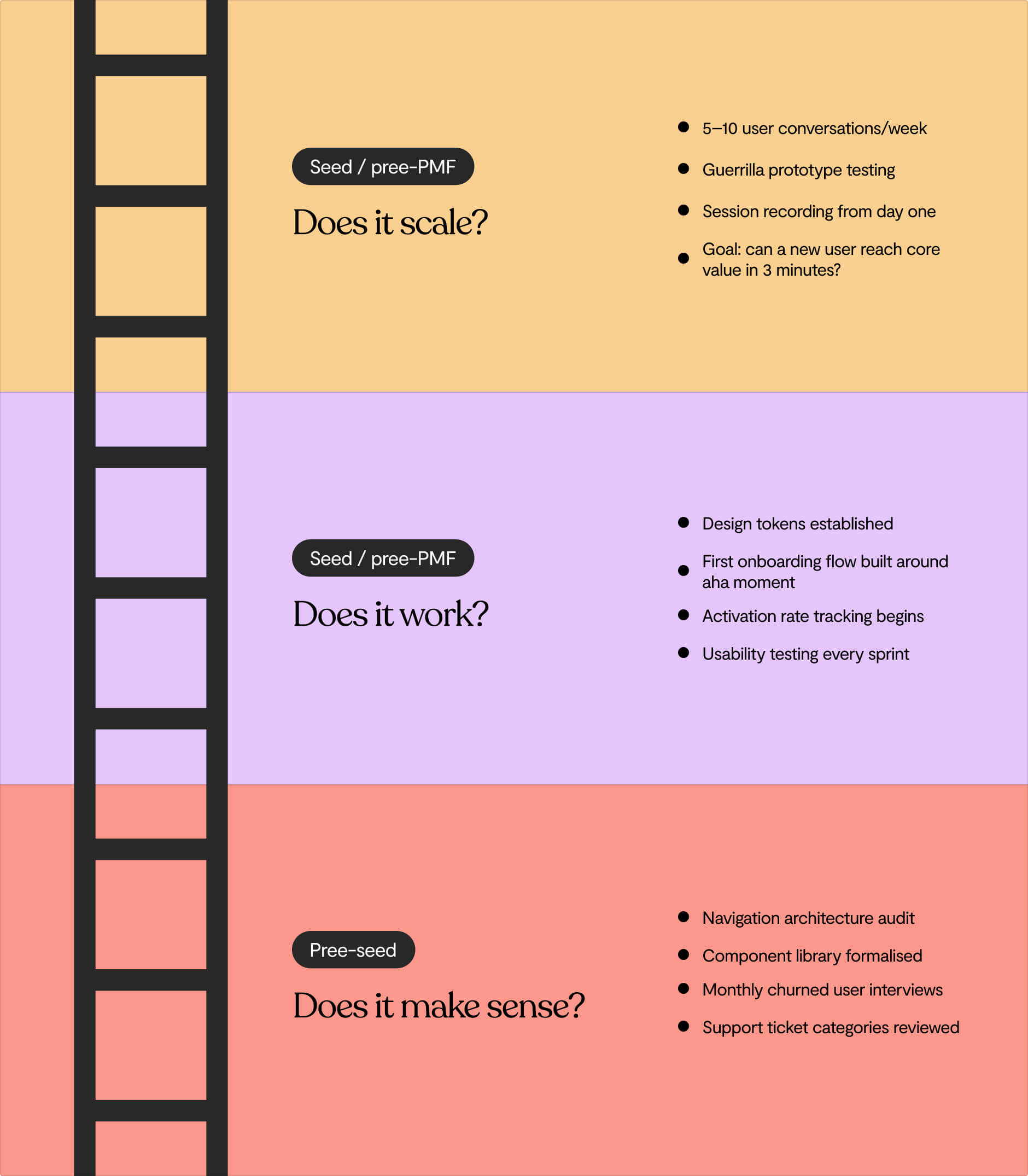
Pre-seed: get out of the building
You're the designer, researcher, and product manager. That's fine, the priority right now is contact with reality.
- Aim for 5–10 user conversations per week. These don't need to be formal research sessions. A 15-minute call or a coffee works.
- Show wireframes or a Figma prototype to potential users and ask them to complete one or two tasks. Watch, don't explain.
- Set up session recording from day one. Hotjar and Microsoft Clarity (free) show you exactly where users struggle without any recruitment required.
- The question to answer at this stage: can a new user reach the core value of your product within three minutes, without guidance from you?
Seed / pre-PMF: build the foundations
You're still finding product-market fit. Now is the time to:
- Establish minimal design foundations: colour tokens, typography scale, 8–10 core components in Figma and code. This takes two days and prevents months of debt.
- Build your first structured onboarding flow around whatever aha moment your early user data suggests.
- Make usability testing a regular cadence. Three to five users per sprint is enough to generate actionable signal.
- Start tracking activation rate: the percentage of sign-ups who reach your aha moment. This is the number that tells you whether your onboarding is working.
Post-PMF / Series A prep: does this scale?
You have traction. The question shifts from "does this work at all?" to "does this scale without breaking?"
- Audit your navigation architecture before you add more features. Can it handle double the feature set without a rebuild? (See our scalability post)
- Formalise your component library. The design system pays for itself at three-plus engineers.
- Build a regular user research cadence. Monthly interviews with recently churned users are especially high-signal.
- Look at your support ticket categories. Recurring questions about how to do X mean X needs better UI affordance, not a better help article.
How do you do UX research with no budget?
You can do effective UX research for free using guerrilla usability testing (showing a prototype to five people in a co-working space), competitor review mining on G2 or Capterra, free session recording tools like Microsoft Clarity, and one structured 15-minute user interview per week.
UX research doesn’t have to require a budget.
- Guerrilla usability testing costs the price of a coffee. Approach someone in a co-working space, show them your prototype, ask them to complete two or three tasks, and observe. Five sessions in an afternoon will surface more useful product insight than weeks of internal debate. The only rule: don't explain anything. Just watch.
- Problem interviews cost nothing except 15 minutes of your time. Talk about their problem. Not your solution.
- Competitor review mining is free. Read 50 negative reviews of your closest competitor on G2 or Capterra. You'll come away with a list of real pain points in real user language – better raw material than any brief you could write yourself.
- Session recording is free up to reasonable volumes on both Hotjar and Microsoft Clarity. Watch five recordings of new users and you'll see exactly where they hesitate, where they look confused, and where they give up.
One interview a week is a research programme. A single 15-minute user conversation per week, done consistently, compounds into something truly useful. The barrier isn't budget, it's making it a habit.
Accessibility: build it in now
Accessibility tends to get skipped in early-stage product work, or treated as a compliance checkbox for later.
The market is larger than you think. There are 1.3 billion people globally living with some form of disability. The global disability market represents $13 trillion in annual disposable income. A 2020 Accenture study found companies improving their product accessibility see a 28% revenue increase. The Centre for Inclusive Design found that accessible products reach four times as many consumers – which is less about disability classification and more about the full set of people who benefit from clearer, more structured products: older adults, mobile users, people in poor lighting, users with temporary impairments.
Accessible HTML also happens to be what AI crawlers prefer. The same structural clarity that helps a screen reader is what helps an AI agent parse and accurately represent your product – which, as we covered in this blog, is increasingly where B2B discovery starts.
The legal exposure is there too. The European Accessibility Act became fully enforceable in June 2025 for private companies in e-commerce, banking, and transport. In the US, 8,800 ADA Title III complaints were filed in 2024: a 7% year-on-year increase. Courts have consistently interpreted ADA Title III to apply to websites and apps.
Retrofitting is expensive. Built in from the start, accessibility adds roughly 1–5% to project budget. Fixing an existing medium-sized site runs $3,000–$10,000. Large enterprise remediations go well above $50,000.
Early-stage accessibility doesn't mean full WCAG 2.2 AA compliance from day one. It means not creating problems you'll pay to fix later:
✔️ Semantic HTML: use <header>, <nav>, <main>, <article> correctly
✔️ Colour contrast: WCAG AA minimum is 4.5:1 for body text (Figma checks this automatically)
✔️ Keyboard navigability: all core flows should work without a mouse
✔️ Alt text on images (also benefits SEO and AI discoverability)
✔️ Specific, human-readable error messages, which good UX demands anyway
None of these add time when you're building from scratch. All of them are expensive to retrofit.
Start here for good UX in an early-stage startup
If you take one thing from this, do it this week: find five people who fit your target user and watch them try to use your product (or prototype) for 15 minutes without explaining anything.
Don't guide. Don't clarify. Watch where they hesitate, where they get confused, where they stop.
You'll learn more in those 75 minutes than from weeks of internal product debate. And you'll have the most important input you could have for every UX decision that comes after.
Good UX in an early-stage startup means making decisions early that don't become rebuilds later. And building enough of a feedback loop with real users that you can tell a product problem from a design problem when you encounter one.
If this was useful, UX for Startups is our monthly newsletter: one practical UX lesson per issue, built on what we're seeing across 50+ startups right now. Subscribe here →
Lumi Studio is a UK-based product design and development studio for tech startups. We've worked with 50+ early-stage and growth-stage teams to find product-market fit, shape UX that drives adoption, and build products their users actually love. Book a call with one of our founders – a 30-minute conversation about where you are and what you're building.
Frequently asked questions
How much does UX cost for an early-stage startup?
Early-stage UX doesn't require a dedicated hire or a big budget. The highest-leverage activities (user interviews, guerrilla usability testing, session recording) cost little to nothing. A minimal design foundation (colour tokens, typography, 8–10 core components) takes two days and prevents months of expensive rework later.
When should a startup hire a UX designer?
The right time is typically at seed stage, once you have enough validated user data to know what you're designing for. Before that, founder-led UX – regular user conversations, prototype testing, session recordings – is both sufficient and valuable. Hiring too early, before PMF, risks building beautifully for the wrong problem.
What's the difference between UX and UI design for startups?
UX (user experience) is about how a product works – the flows, the information architecture, the onboarding logic, the clarity of each step. UI (user interface) is how it looks – visual design, components, branding. For early-stage startups, UX decisions matter more and compound faster. A visually polished product with poor UX still churns users. A rough-looking product with clear, intuitive flows can still retain them.
How do you measure UX quality without a UX team?
Four metrics tell you most of what you need to know: activation rate (what percentage of sign-ups reach your aha moment), time-to-value (how long it takes to get there), first-session drop-off (where new users leave), and support ticket categories (recurring questions are direct UX audits). All of these are measurable with free tools from day one.
What's the biggest UX mistake early-stage startups make?
Building onboarding as an afterthought. The average app loses over 75% of new users on day one – not because the product is bad, but because users couldn't figure out how to get value from it fast enough. Onboarding isn't a feature you add after the product is built. It's the primary design problem.


